Ubuntu 24.04 Proxmox Cloud-Init Prep

So yeah, templates are probably the least exciting thing to talk about, but I consider them foundational. Properly prepared templates mean less pain and simpler, more predictable deployments.
I keep cloud-init templates for just about every Linux distro an enterprise would care about. It gives me total freedom in how I deploy and makes it easy to compare behaviors across platforms.
This document provides a clean, repeatable, production grade procedure for building an Ubuntu 24.04 (Noble) template that works reliably with Proxmox cloud init.
Create an Ubuntu 24.04 VM template that reliably supports:
- Static IP assignment via Proxmox
- Root password injection
- Root SSH authentication
- Hostname injection
- Clean, repeatable first‑boot behavior
Inside the Ubuntu VM (Before Templating)
Install Required Packages
apt update
apt install -y cloud-init qemu-guest-agent openssh-server
Enable services:
systemctl enable --now ssh
systemctl start qemu-guest-agent
Note: On Ubuntu 24.04,
qemu-guest-agentmay be a static unit. Starting it is sufficient.
Ensure Cloud-Init Is Enabled
ls /etc/cloud/cloud-init.disabledIf the file exists:
rm -f /etc/cloud/cloud-init.disabledForce Proxmox Datasource (REQUIRED)
Ubuntu often ships with multiple datasources enabled. For Proxmox, force NoCloud.
cat > /etc/cloud/cloud.cfg.d/99-proxmox.cfg <<EOF
datasource_list: [ NoCloud, ConfigDrive ]
EOF
Verify:
cat /etc/cloud/cloud.cfg.d/99-proxmox.cfgAllow Root SSH Login (IMPORTANT)
Ubuntu disables root login by default.
Set a root password:
passwd rootnano /etc/ssh/sshd_configEnsure:
PermitRootLogin yes
PasswordAuthentication yes
Restart SSH:
systemctl restart sshClean Cloud-Init State (NON‑OPTIONAL)
cloud-init clean --logs
truncate -s 0 /etc/machine-id
rm -f /var/lib/dbus/machine-id
Power off the VM:
shutdown -h nowConvert VM into a Cloud-Init Template (Proxmox Host)
Assuming VM ID is 124:
qm set 124 --ide2 local-lvm:cloudinit
qm set 124 --boot order=scsi0
qm template 124
The Ubuntu VM is now a reusable cloud-init template.
This is what it should look like from a Proxmox perspective in the UI
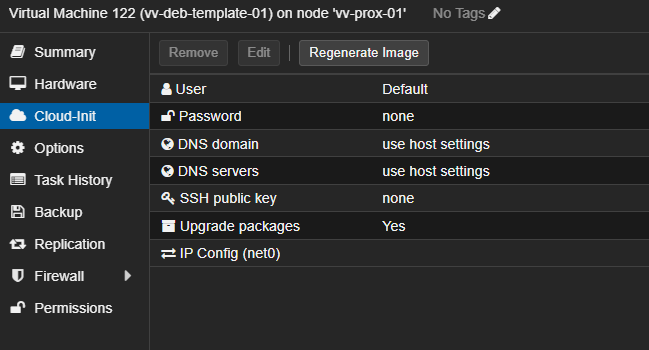
Test Deployment (Clone + Configure + Boot)
This validates IP, hostname, root password, SSH, and metadata in one pass.
Clone the Template
qm clone 124 301 --name ubuntu-ci-test --full 1Apply Cloud-Init Configuration (INCLUDING HOSTNAME)
qm set 401 \
  --ciuser root \
  --cipassword 'passwordhere' \
  --hostname vm-name-01 \
  --ipconfig0 ip=xxx.xx.x.xx/xx ,gw=xxx.xx.x.x \
  --nameserver xxx.xxx.xx.x\
  --searchdomain domain.com
Boot the VM
qm start 301Validation Checklist
From another system:
ssh [email protected]Inside the VM:
hostname
ip a
cloud-init status
Expected:
- Hostname matches
--hostname - Static IP applied correctly
cloud-init status: done- Root SSH login succeeds
If You See This Error
Use of uninitialized value in split at Cloudinit.pm line 115It indicates stale or invalid cloud-init metadata.
Fix on Proxmox Host
qm set 301 --delete ciuser --delete cipassword --delete ipconfig0 --delete nameserver --delete searchdomain --delete hostname
qm set 301 --ide2 local-lvm:cloudinit
Then re-apply configuration and boot again.
That’s it. You should now have a repeatable way to deploy templates consistently. This same basic approach works with almost any operating system.
I keep multiple Linux flavors templated, so spinning up a fresh VM is trivial and predictable every time. Build once, reuse forever.
Hardening steps like disabling root SSH, enforcing key based authentication, and similar controls will be covered in later tutorials.
Thanks for reading!
-Christian